
Views: 0 Author: Site Editor Publish Time: 2026-05-27 Origin: Site


Smart vapes equipped with digital displays are rapidly dominating the market. You probably love having access to real-time battery stats and precise puff counters. However, a common hesitation arises when it is time to plug them in. Will your standard smartphone chargers fry the new screen or delicate microcontroller?
While core lithium-ion technology remains largely unchanged, adding screens and smart chips introduces much tighter tolerances for voltage and current. A Display Screen Vape Battery doesn't require a proprietary "special" charger, but it strictly demands the correct power output. Using the wrong adapter can permanently damage the display or severely degrade your battery life. We will break down exactly how you should handle these smart devices. You will learn the exact criteria for charging them safely and effectively, ensuring you get the maximum lifespan out of your hardware.
No Fast Chargers: High-wattage smartphone chargers (18W/30W) can overwhelm the microchips in display vapes; stick to 5V/1A adapters.
Smart Trickle Charging: The screen will likely show rapid charging up to 80%, then significantly slow down—this is an intentional safety feature, not a defect.
Sensory Cues Matter: Even with a digital display, rely on flavor and vapor production to confirm when a recharge is actually needed.
Lifespan Baseline: With proper charging and temperature control (50°F–85°F), a quality display battery will last over 500 complete charge cycles.
To understand why a modern smart vape behaves differently during a recharge, you must look inside the casing. Older, simpler devices only contained a basic lithium-ion cell and a crude firing switch. Today, an LED Screen 510 Thread Vape Pen contains intricate microcontrollers. These small logic boards manage the user interface, record puff counts, and calculate real-time battery percentages.
These advanced microchips are highly sensitive to voltage spikes. When unregulated power hits a basic circuit board, the components absorb the excess energy as heat. Over time, this heat degrades the delicate solder joints connecting the LED screen to the mainboard. This vulnerability leads us to a crucial distinction regarding charging habits.
Many users fall victim to the "special charger" myth. You do not need to buy a brand-specific wall plug or a proprietary charging dock. The required special treatment lies purely in output matching, not in buying exclusive hardware. As long as you provide the precise electrical current the microchip expects, the device will charge safely.
Ignoring this compatibility rule introduces serious risks. If you force an incompatible power load into a smart vape, several failures can occur. The most common consequence is display screen burnout. You might plug the device in, only to find the screen goes permanently black while the heating element still fires. Furthermore, incorrect currents confuse the battery monitoring chip, resulting in false percentage readings where the screen jumps erratically from 100% to 20%. In worst-case scenarios, excess heat causes localized battery swelling, permanently ruining the device.
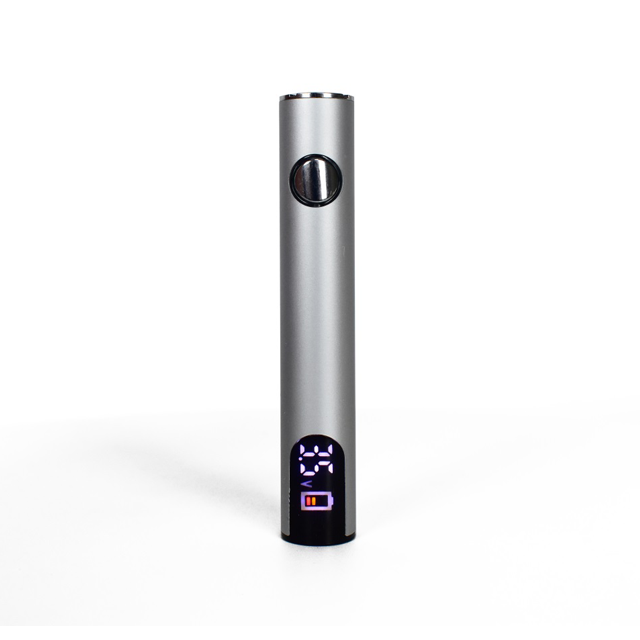
Navigating the world of charging bricks can feel overwhelming, but the rules for vape hardware are remarkably straightforward. Nearly all vape batteries operate on a standard 5V (five volts) output requirement. The primary variable you must monitor is the amperage.
Amperage determines how much electrical current flows into the battery at any given moment. Standard pen styles and small display mods optimally draw between 0.5A and 1.0A. For example, a 650mAh Display USB-C THC CBD Recharge device lacks the heavy-duty heat sinks found in massive box mods. Sending too much current into a 650mAh cell overwhelms its chemical absorption rate. Conversely, larger external cell mods (utilizing dual 18650 or 21700 batteries) can safely accept up to 2.0A.
This brings us to the most critical warning for modern vape users: the smartphone "fast charge" trap. We strongly advise against using modern Power Delivery (PD) adapters or high-wattage smartphone bricks. Devices like Apple USB-C bricks or laptop chargers push 18W, 30W, or even 65W of power. Unless your vape specifically advertises fast-charge compatibility on its packaging, you should avoid these bricks completely.
Why are they so dangerous? High-end chargers use smart protocols to negotiate power delivery. Unfortunately, many standard vape microchips cannot communicate with these advanced chargers. When the charger fails to negotiate a safe speed, it might default to pushing a current that easily bypasses the vape's internal regulation. This mismatch causes excessive heat, risking irreversible damage to the display logic board.
Charger Source | Typical Output | Suitability for Smart Vapes | Risk Level |
|---|---|---|---|
Standard Wall Brick | 5V / 1.0A | Excellent. Matches internal chip limits safely. | Low |
Laptop/PC USB Port | 5V / 0.5A - 0.9A | Highly Recommended. Stable, gentle current. | Low |
Car USB Port | Variable (Often unstable) | Not Recommended. Prone to voltage spikes. | Moderate |
Phone Fast Charger (PD) | 9V-12V / 2.0A - 3.0A+ | Avoid entirely unless vape specifies PD support. | High |
If you watch your smart vape display closely during a charging session, you will notice a distinct behavioral pattern. The charging curve is rarely linear. Instead, you will witness the battery racing from 0% to 80% quite quickly. Once it hits the 80% mark, the percentage crawl significantly slows down as it approaches 100%. Many users mistake this slowdown for a defective battery or a broken screen.
This visual phenomenon actually represents an intentional, highly sophisticated safety feature known as "Trickle Charging." To understand the technical justification behind this, you need a basic grasp of modern lithium-ion systems. During the first phase of charging (Constant Current), the battery freely accepts a high flow of energy. However, as the cell nears maximum capacity, the internal resistance increases.
If the charger continued pumping energy at the same high speed, the battery would rapidly overheat and suffer severe chemical degradation. To prevent cell degradation and internal fires, the microchip throttles the current down to a slow "trickle" for the final 20%. This constant voltage phase gently tops off the battery without generating destructive heat.
Understanding this curve also helps debunk a persistent battery memory myth. Years ago, older nickel-cadmium batteries required users to drain them completely to 0% and charge them for 12 hours out of the box. Modern vapes do not need this treatment. In fact, fully draining a lithium cell routinely will destroy its capacity. Short, top-up charges are actually the healthiest practice. Keeping your device floating between 20% and 80% reduces stress on the internal chemistry and significantly extends the hardware's lifespan.
Having a bright digital display makes monitoring your device incredibly convenient, but you should combine visual data with practical habits. As a general best practice, we recommend the 20% rule. You should plug your device in as soon as the digital display hits 20%. Pushing the battery down to 0% forces the lithium cells to work much harder to generate the required voltage, which stresses the internal chemistry.
However, technology is not flawless. Sometimes a screen might malfunction, freeze, or display a misread percentage. If you suspect the digital readout is inaccurate, you must rely on sensory backups to judge the battery state. Even the smartest device will physically reveal its power limits.
Vapor Production Drops: When the battery sags, the heating coil receives less power. You will notice clouds are not as dense as they were on a full charge.
Muted Flavor Profiles: Low voltage translates to lower heating temperatures. E-liquid requires optimal heat to vaporize flavor compounds fully. If the taste becomes remarkably subtle, it is time for a recharge.
What happens if your device plugs in, but the screen remains entirely dark? Do not immediately assume the battery is dead. Troubleshooting a dead screen often involves simple physical fixes. First, check the connection. Pocket lint frequently gets compacted inside the port.
Clean the Port: Use a non-conductive tool, like a wooden toothpick, to gently sweep dust or lint out of the USB-C port. Never use metal pins, as they can cause a short circuit.
Check the Lock Mechanism: Many smart vapes feature a 5-click lock mechanism to prevent accidental misfires in pockets. Press the firing button rapidly five times to see if the screen wakes up.
Test Another Cable: USB cables degrade internally faster than vape hardware. Swap to a known working cable and a reliable 5V/1A wall brick before discarding the device.
Smart vapes represent a solid investment, and treating them correctly yields a much longer return on that investment. The internal lithium-ion battery and the delicate LED screen both require disciplined operating environments. Implementing a few core rules will protect your hardware from premature failure.
1. Strict Temperature Control
Heat is the absolute worst enemy of both lithium-ion batteries and LCD/LED screen components. You should maintain an ideal charging and operating temperature between 50°F and 85°F (10°C–29°C). Never leave your device charging on a sunny windowsill, and never store it in a hot car during the summer. Extreme heat accelerates chemical breakdown inside the battery and can actually melt the adhesive binding the display screen to the chassis.
2. Proper Storage Protocol
Users frequently shelve their devices for weeks at a time. If you plan to store your vape, you must prepare it correctly. Charge the device to exactly 80% before putting it in a drawer. Storing a battery at 100% capacity places maximum voltage stress on the internal chemistry. Conversely, storing it at 0% allows the battery to slip into a deep discharge state, from which it may never recover. A partial charge preserves the cell health perfectly.
3. Avoid Pass-Through Charging (Unless Specified)
Pass-through charging refers to the act of vaping while the device is actively plugged into the wall. You must avoid this habit entirely. Simultaneous charging and discharging generates compounding, excessive heat. This intense thermal load damages both the delicate screen circuitry and the core battery cell. Unless your device manual explicitly states it features a dedicated bypass chip for safe pass-through operation, always unplug it before taking a puff.
To keep your equipment running flawlessly, remember that a display screen vape battery doesn't require a proprietary charger. Instead, it requires disciplined charging habits and an understanding of electrical outputs. You can drastically improve the longevity of your device by strictly using standard 1A/5V bricks, relying on laptop USB ports, and aggressively avoiding high-speed phone fast-chargers.
Your digital display is a fantastic tool for monitoring battery health, provided you feed the microchip the stable current it demands. Take a few minutes today to audit your current charging bricks. Discard or repurpose those aggressive fast chargers. If you are in the market for an upgrade, browse high-quality, smart-chip-protected devices that offer accurate readouts and built-in overcharge protection. Treating your vape with a little electrical respect ensures you get every single drop of performance out of it.
A: Yes, PC and laptop USB ports typically output between 0.5A and 0.9A. This low amperage makes them one of the safest, most stable power sources for sensitive screen-equipped vapes. They provide a gentle charge that prevents the microchip and lithium cell from overheating.
A: This message usually indicates a short circuit, an overcharge protection trigger, or a dirty connection terminal. It is an intentional safety failsafe, not necessarily a broken device. Clean your charging port carefully and inspect your cartridge connections before attempting to charge again.
A: Even though modern smart vapes have internal overcharge cut-offs, leaving them plugged in overnight is highly discouraged. Unplugging the device once the screen indicates 100% prevents micro-cycling. This habit protects the battery's overall lifespan and completely eliminates any remote fire risks.


